
Apple’s First Background Security Improvement (BSI) for macOS, iOS, & iPad: What IT Admins Need to Know
Apple today shipped its first-ever Background Security Improvement (BSI) — a new, lightweight security patching mechanism that replaces the old Rapid Security Response (RSR) system, which was discontinued in 2023. The update patches a WebKit vulnerability affecting Safari on Macs, iPhones, and iPads, and it does so without requiring a full OS restart.
If you manage Apple devices, here’s everything you need to know, and how to push it to your fleet right now.
What Happened
Apple issued a security advisory disclosing a bug in WebKit, the browser engine that powers Safari and a wide range of other apps. The flaw, if exploited, could allow a malicious website to access data from a different website open in the same browser session — a category of attack known as cross-site data access.
The fix was released not as a traditional OS update, but as a lightweight delivery mechanism called a Background Security Improvement (formerly Rapid Security Response or RSR). On macOS Tahoe, the update is identified as BSI (a)-25D771280a, and it bumps Safari from version 26.3.1 (21623.2.7.11.7) to 26.3.1 (21623.2.7.111.2). On iPhones and iPads, the update similarly identifies as iOS/iPadOS 26.3.1 (a).
What Makes BSIs Different from Traditional OS Updates
Background Security Improvements are Apple’s answer to a core challenge in software security: how do you get critical fixes to users quickly, without the friction of a full OS update?
Traditional OS updates are heavyweight — they require large downloads, reboots, and often get deferred by users for days or weeks. BSIs are designed to cut through that. Apple describes them as “lightweight” patches aimed at specific components like Safari, WebKit, and key system libraries that benefit from rapid, targeted maintenance.
This is actually a rebranding of a familiar concept. RSR (Rapid Security Response) was Apple’s original version of this mechanism, last used in 2023 with macOS 13. With the release of OS 26, Apple retired the RSR name in favor of Background Security Improvements — same idea, new name, and now making its debut.
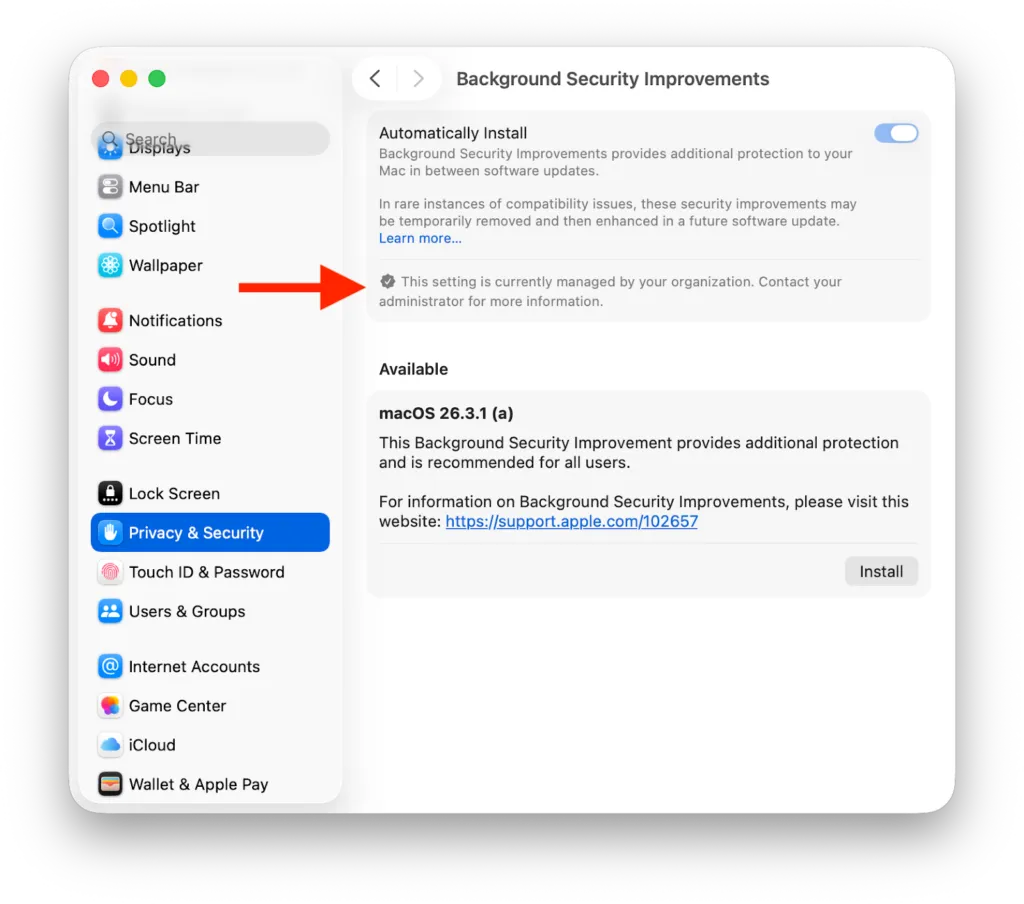
Important prerequisite: BSIs are available on devices running iOS, iPadOS, and macOS 26.3.1 only. Devices cannot jump straight from, say, 26.2.0 to the 26.3.1 (a) BSI patch — they must first install the base OS 26.3.1 update. For manual installs, the BSI can be found under Privacy & Security settings → Background Security Improvements.
The Vulnerability
The bug lives in WebKit and relates to cross-site data access — a category of vulnerability that could let a malicious site read data from another site you have open in Safari simultaneously. Apple has not indicated this vulnerability is being actively exploited in the wild.
That said, browser engine vulnerabilities are a perpetual target for attackers, and the speed with which Apple deployed a fix — using this brand-new delivery system — signals the company considers it a meaningful priority.
How to Deploy the BSI via Addigy
Option 1: Install via Automatic Actions
If you configure the Update Settings Declaration with Automatic Actions, it will push to macOS 26.3.1+ devices in your policy settings and automatically install the BSI once the deferral period has elapsed. Updates install when devices meet state of charge, free space, and user inactivity criteria.
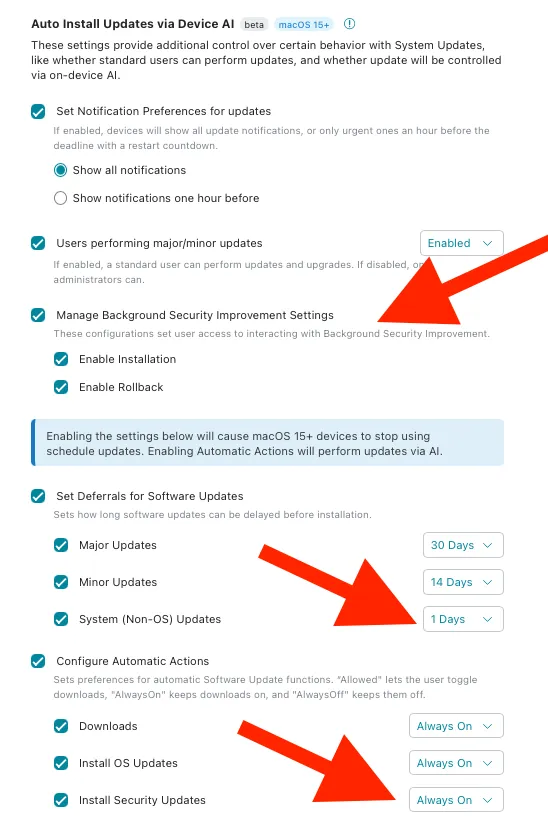
Once configured, you’ll see the Privacy & Security → Background Security Improvements section marked as managed — auto-install is enforced and cannot be modified by the end user.
Option 2: Install via MacManage Prompt
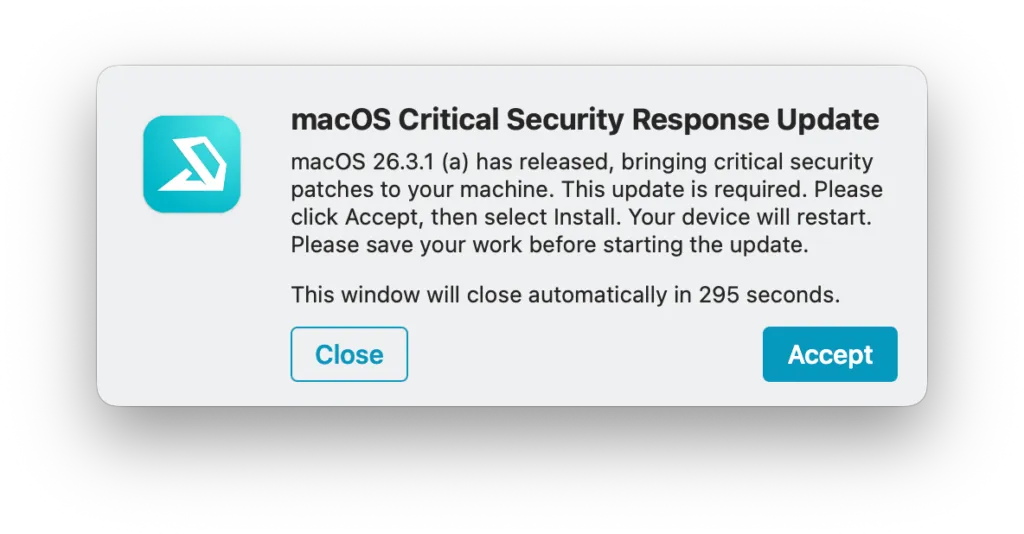
Shoutout to Addigy Community member Tyler Williams, who put together a script to prompt end users about the latest macOS security update using the built-in MacManage (Self Service) tool.
Find it in the Addigy Community here: https://app.addigy.com/community/scripts/69b9d95cf6fc47c1ce2ae956
When run, end users see a prompt letting them know a security update is required, and it opens the System Preferences pane so they can initiate the update themselves.
Stay Ahead of Apple’s Security Cadence
BSIs are a signal that Apple is accelerating how fast it can ship security fixes — which means the window between patch release and potential exploitation is narrowing. Having an MDM strategy that automates deployment the moment these updates drop isn’t just convenient, it’s becoming a security baseline.
Not managing Apple security updates centrally yet? See Addigy in action for how fast you can get patches like this across your entire fleet.
Frequently Asked Questions
Do BSIs require a restart?
No — that’s one of the key advantages. Background Security Improvements are designed to apply without a full system reboot, reducing disruption for end users and increasing the likelihood of fast, fleet-wide adoption.
What's the difference between a BSI and a regular macOS update?
Regular OS updates are comprehensive — they update the full system and always require a restart. BSIs are surgical: they patch specific, high-priority components like WebKit or Safari and can be applied in the background with minimal disruption.
What happened to Rapid Security Response (RSR)?
RSR was Apple’s previous version of this concept, last deployed in 2023 with macOS 13. With the release of OS 26, Apple retired the RSR name and replaced it with Background Security Improvements. Same core idea, new branding.
Is this vulnerability actively being exploited?
Apple has not indicated active exploitation in the wild as of this writing. That said, WebKit vulnerabilities are a high-value target, and patching quickly is always the right call.