How to Defer OS 27 for macOS, iOS, iPadOS, and tvOS Devices
It’s OS release season again, and OS 27 is here on Monday, September 14th: macOS 27 Golden Gate, iOS 27, iPadOS 27, and tvOS 27. Now is the time to decide how and when your fleet moves to the latest, most secure version of each platform.
You may not be ready to update on day one. That’s fine.. but “not yet” needs to be a deliberate setting, not an accident. Here’s how to control the timing, and what changed about the way you set it.
One Version Number to Rule Them All
If you’ve managed Apple devices for a while, you’ve seen the release cycle shift. In 2025, Apple standardized on a single, year-based version number across all of its platforms. Everything jumped to OS 26 that fall, and OS 27 is now the current release across the board.
That makes planning simpler in one sense: you have one number to track instead of four. But it also means major releases land on every device type at once. A deferral strategy matters more than it used to.
The Old Deferral Path Is Deprecated
Here’s the important part: the restrictions profile admins have traditionally used for update deferrals is deprecated, and on OS 26 and later it is no longer advised. A profile built the old way may still deploy without error and still show as installed, while doing nothing to hold back the update.
Deferral now belongs in a declarative configuration. That isn’t just a best-practice preference.
Setting the values declaratively means the OS acknowledges them properly, and it puts you on the path for declarative features going forward — including activations, which let a device apply a configuration change on its own, when it wakes, without you pushing a new profile to it.
The New Way: The Global Settings Declaration
Starting with iOS 18, iPadOS 18, tvOS 18, and macOS 15, Apple introduced the Global Settings declaration for OS updates. This is now the right way to defer updates: it uses the newer protocol the operating system natively recognizes, unlike the legacy restrictions payload.
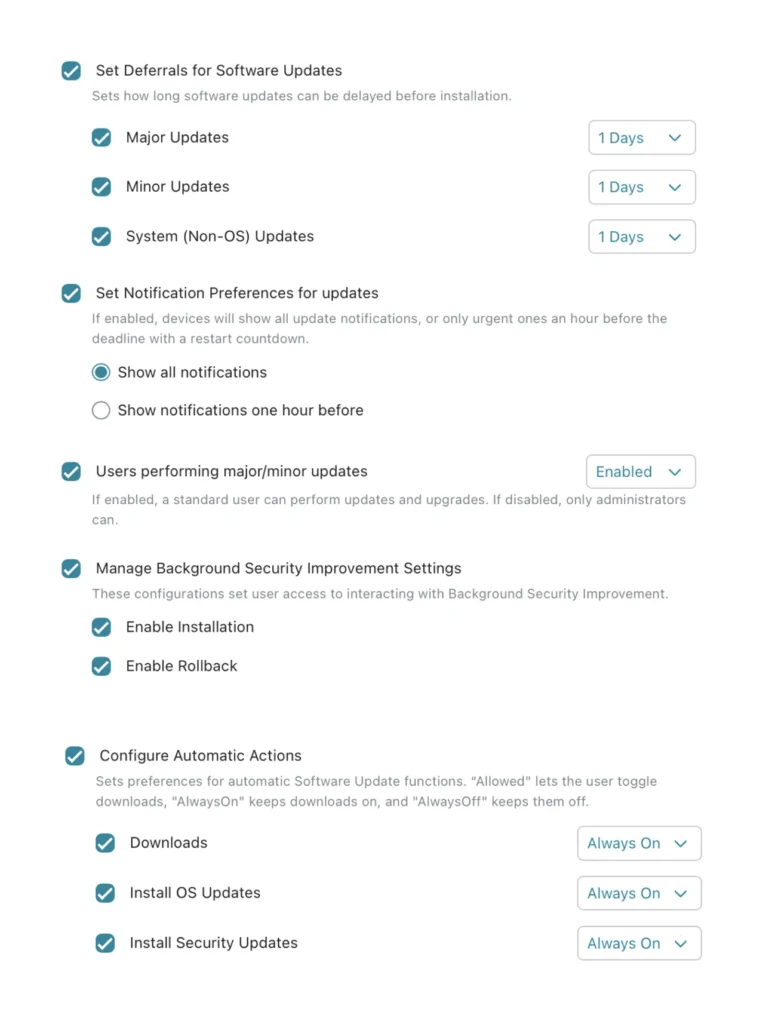
The global settings declaration gives you control over:
- Deferrals of 1 to 90 days
- Choose how long major, minor, and non-system updates stay hidden from end users in the Settings app.
- User access to Background Security Improvement updates
- Control whether end users can install or roll back Background Security Improvement updates.
- Who can install updates
- Control whether non-administrators on local devices can install OS updates (macOS only).
- Automatic update actions
- Manage the built-in behavior that updates a device overnight or while it’s idle. macOS acts automatically when the device is inactive, has sufficient battery charge, has a solid network connection, and is running apps it can close and restore after the reboot.
Set your deferral window in the Global Settings declaration, and your macOS, iOS, iPadOS, and tvOS devices won’t surface OS 27 to end users until you’re ready.
This can be found in Addigy under the Policy -> Updates page and then under the respective platforms (macOS, iOS, etc.). See screenshots below:
Other macOS deferral paths…
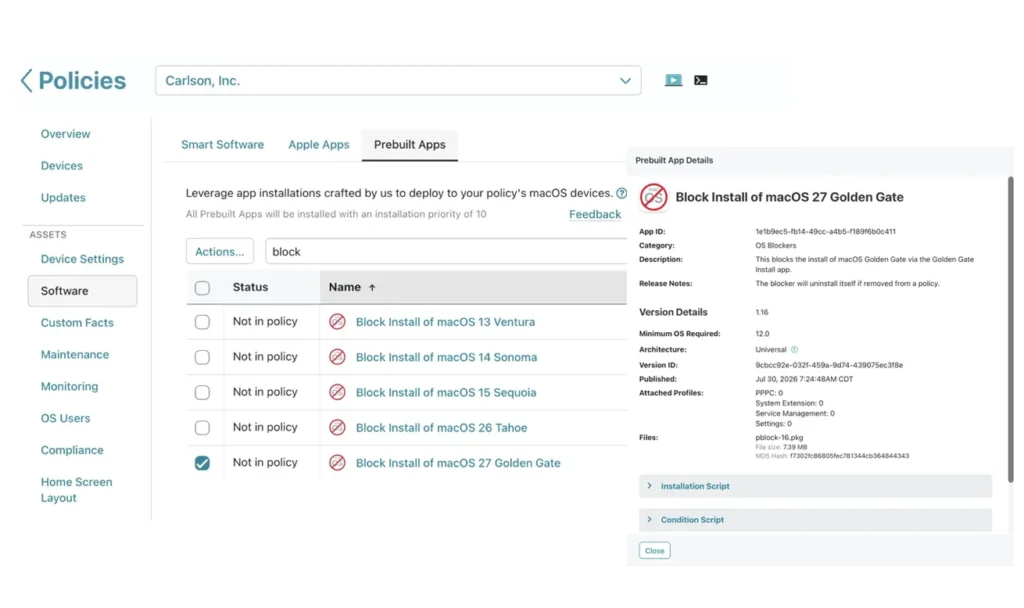
The Global Settings declaration covers deferrals across platforms, but macOS has one extra route a user can take to upgrade outside of System Settings: downloading the full installer from the App Store. That installer (15 GB or more, delivered as a .app containing the complete OS) bypasses your deferral entirely.
You can close that route too. Deploy the process blocker for macOS 27 Golden Gate from the Prebuilt Apps library in Addigy. It prevents the installer app from running, and it uninstalls itself as soon as you remove it from the policy.
Learn More about OS 27 Deferral
For step-by-step instructions on setting deferrals in Addigy, see How to Defer System Updates/Upgrades via Addigy.
Not managing your Apple fleet with Addigy yet? Start a free trial and get your OS 27 deferral policy in place before your users find the update on their own.