New Macs, Day One Ready. No Waiting with Prebuilt Apps in Addigy Assist
When we launched Addigy Assist in 2025, our goal was to make onboarding seamless with real-time visibility. Later that year, we introduced Prebuilt Apps to simplify app deployment. Today, we bring these two together: Prebuilt Apps are now fully supported in Addigy Assist.
What does this mean for you? No more scripts or guesswork. Now, during zero-touch onboarding, end users see their Prebuilt Apps install in real time. Unlike other tools, Addigy Assist adapts with your policies—no maintenance required. While Self Service supports ongoing app access later, today’s update ensures your devices are ready from day one.
Why This Matters
One of the biggest challenges during device onboarding is the gap between device enrollment and app availability. Admins know the apps are coming—but end users don’t.
That uncertainty often leads to the same questions on day one:
“Where are my apps?”
“Is something still installing?”
Addigy Assist removes that uncertainty by showing exactly what is happening on the device during onboarding.
With Prebuilt Apps now supported in Assist, admins can deliver a true zero-touch setup experience where applications install automatically while users see real-time progress.
Why Prebuilt Apps Exist
Prebuilt Apps were designed to remove the repetitive work admins face when deploying common software.
Instead of packaging, maintaining, and updating applications yourself, Prebuilt Apps provide a ready-to-use catalog of commonly deployed applications maintained by Addigy. This reduces the time spent managing installers while keeping software deployments consistent across devices.
By supporting Prebuilt Apps directly in Assist, those same applications can now be part of the day-one onboarding experience.
What’s New in This Release
Prebuilt Apps are now supported in Assist
Prebuilt Apps are now a supported asset type within Addigy Assist.
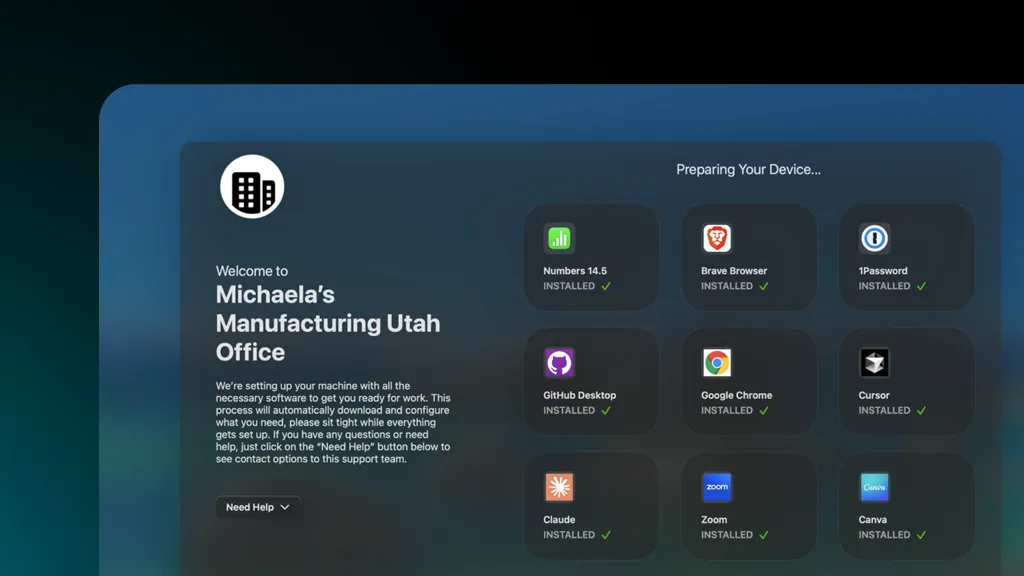
When the Assist window appears during enrollment, it can now display Prebuilt Apps alongside other assets already supported in Assist. End users can see installation progress in real time as applications are being deployed.
Admins can also control which apps appear in the Assist window by choosing whether each application should be shown or hidden.
Real-time visibility during onboarding
Assist provides clear visibility into what is happening on the device while it is being configured.
Instead of relying on scripts or static status messages, Assist reflects the actual assets assigned to the device through policy. When apps are added or removed from the enrollment policy, Assist automatically reflects those changes.
This means admins don’t need to maintain custom onboarding workflows or update scripts when configurations change.
Cleaner onboarding experiences
Prebuilt Apps configured as update-only will be skipped during enrollment if the application is not already installed on the device.
Admins can choose whether skipped apps appear in the Assist window or remain hidden, allowing the onboarding experience to stay focused on the applications that are actively installing.
Part of the Device Lifecycle
Addigy Assist focuses on the first stage of the device lifecycle: onboarding.
It provides visibility into what is happening on the device as it is being set up.
After onboarding is complete, Self Service for Mac (MacManage) allows users to install company-approved applications on demand. This helps organizations avoid installing unnecessary software on every device while still giving users access to the tools they need.
Support for Prebuilt Apps in Self Service was also recently introduced, allowing these applications to appear in the Self Service catalog alongside other asset types.
Together, Assist and Self Service support the full application lifecycle:
Assist → onboarding visibility during enrollment
Self Service → on-demand access to approved applications
Looking Ahead
As Addigy continues evolving its application deployment platform, Prebuilt Apps represent the future of how common software is delivered across devices.
With the Public Software Library moving toward deprecation, Prebuilt Apps provide a simpler and more integrated approach to application deployment across onboarding and ongoing device management.
By supporting Prebuilt Apps directly in Assist, admins can now deliver a smoother onboarding experience while reducing the effort required to maintain software deployments over time.
That’s where Self-Service Prebuilt Apps comes in next. End users will be able to install and update apps on demand, without waiting on IT. Less back-and-forth, fewer tickets, and more autonomy for your team.
If your current Apple MDM can’t do this, it might be time to see what you’re missing.
See Addigy in Action.