What Is Apple Setup Assistant? A Guide for IT Admins
First impressions matter, especially during onboarding. A new employee opens their Mac on day one expecting to get started, but instead faces a long sequence of prompts: Apple ID, Wi-Fi, passcodes, transfers, privacy screens. IT hopes the device activates correctly, enrolls in MDM, and doesn’t generate a support ticket.
That entire moment is governed by Apple Setup Assistant: the built-in onboarding experience that runs on every new or erased Apple device. For users, it’s a guided welcome. For IT, it’s the critical checkpoint where activation, security, and Automated Device Enrollment (ADE) converge.
Why does this matter?
Because how Setup Assistant is configured determines whether onboarding is predictable and scalable—or whether IT gets bogged down in rework. This guide explains what Setup Assistant is, how it behaves across platforms, and how Addigy helps IT teams turn it into a seamless, zero-touch workflow.
What is Apple Setup Assistant?
Setup Assistant is Apple’s native onboarding tool that appears on every new or freshly erased iPhone, iPad, and Mac.
It governs:
- Language and region selection
- Network setup
- Device activation
- Apple ID sign-in (or skip)
- Passcode, Touch ID, or Face ID setup
- Siri, Location Services, and other personalization choices
Behind the scenes, Setup Assistant checks Apple’s activation servers to confirm whether the device is linked to Apple Business Manager (ABM) (make sure your Apple Push Certification is active) or Apple School Manager (ASM). If assigned, Setup Assistant automatically launches Automated Device Enrollment (ADE), ensuring supervision, enforcing MDM enrollment settings, and applying organizational settings before the user reaches the home screen.
It is more than a welcome wizard. It is the foundation of secure, compliant Apple deployments.
The Apple Setup Assistant Experience
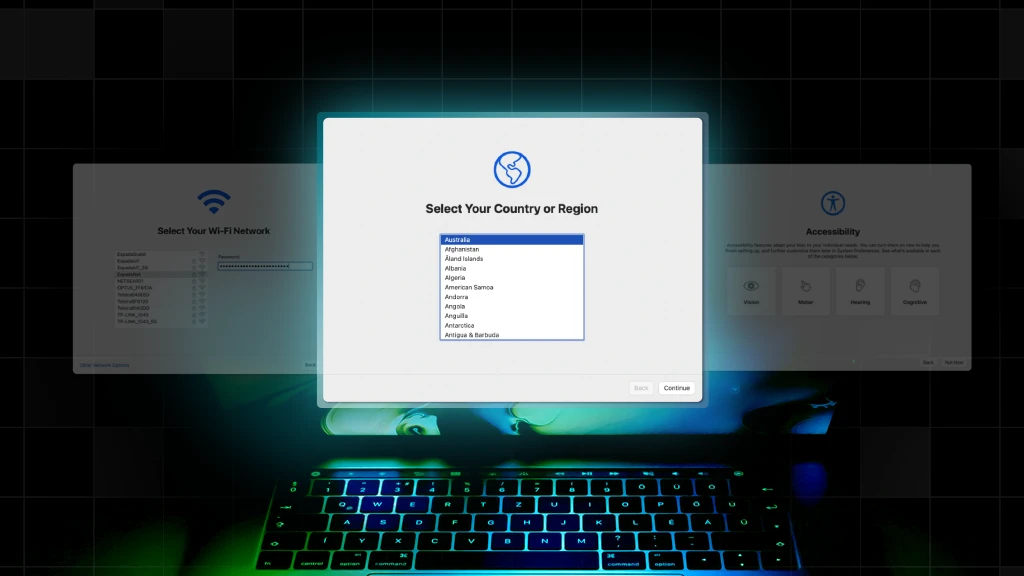
For end users, Setup Assistant feels like a guided walk-through. While steps vary across iOS, iPadOS, and macOS, the flow typically includes:
1. Language & Region: Users select their language, locale, and keyboard configuration.
2. Wi-Fi or Network Setup: The device connects to a network to reach Apple’s activation servers — a prerequisite for continuing setup, especially in ADE deployments.
3. Activation: Apple verifies the device’s status and checks whether it is organization-owned.
- If assigned in ABM → Setup Assistant enforces Automated Device Enrollment.
- If not → the user experiences the standard consumer flow.
4. Data Migration: Users are offered multiple restore or transfer options:
- Quick Start (iOS/iPadOS)
- iCloud Restore
- Migration Assistant (macOS)
- Direct device-to-device transfer
Note: Organizations may restrict data transfers for compliance or security.
5. Security & Personalization: Depending on platform, users may configure:
- Passcode or password
- Touch ID / Face ID
- Apple ID sign-in
- Siri
- Location Services
- Screen Time
6. Platform Differences & New Enhancements: macOS includes account creation and FileVault-related steps, and now supports accelerated setup using a nearby iPhone or iPad.
On its own, Setup Assistant is flexible — but enterprises need more control.
Apple Setup Assistant in Enterprise Deployments
When devices are purchased through authorized channels and assigned in Apple Business Manager, Automated Device Enrollment (ADE) turns Setup Assistant into the backbone of zero-touch deployment.
How ADE Transforms Setup Assistant
ADE automatically:
- Detects and enforces MDM enrollment
- Applies supervision (iOS/iPadOS)
- Blocks MDM profile removal
- Installs configuration profiles early
- Controls or removes setup panes
- Ensures consistent onboarding anywhere in the world
This eliminates manual IT setup and standardizes activation across distributed teams.
Panes Admins Commonly Skip
These panes aren’t required for corporate-managed devices, so most teams skip them during enrollment.
- Apple ID / iCloud
- Siri
- Location Services
- Touch ID / Face ID
- Privacy screens
- Terms & Conditions
- Screen Time
Streamlining these steps reduces friction and accelerates time-to-productivity.
User-Driven vs. Zero-Touch Enrollment: At a Glance
To understand where Setup Assistant fits into deployment, it helps to compare the two primary enrollment approaches.
- User-driven enrollment: More flexible, but error-prone.
- Zero-touch enrollment: Fully automated during Setup Assistant, ideal for scale.
It’s important to note that Setup Assistant cannot be relaunched; if something goes wrong or ADE fails, IT usually has to wipe and start over or rely on separate tooling and manual guidance. For IT managers running large or distributed fleets, this makes the onboarding moment fragile: one misstep during Setup Assistant can break the “zero-touch” promise and force white-glove intervention.
How Addigy Assist Enhances Control
While Setup Assistant is Apple’s mandatory first-run experience, Addigy Assist is the layer that turns that moment into a managed, automated workflow instead of a black box for users and IT.
Addigy enables admins to define:
- Which panes appear or are hidden
- Authentication requirements (Azure AD / Okta via Addigy Identity)
- Local admin vs. standard account creation
- Wi-Fi and configuration profile delivery
- Department/location-based logic
PreStage is where onboarding consistency becomes a repeatable asset.
Managing Setup Assistant with MDM
MDM extends Setup Assistant by giving IT precise control over onboarding behavior.
Admins can configure:
- Setup Assistant skip keys (Siri, Apple ID, Touch ID, Location Services, etc.)
- Password/passcode requirements
- Managed Apple ID behavior
- Directory authentication requirements
- FileVault enforcement and escrow settings on macOS
- Wi-Fi and VPN auto-join profiles
- Migration/restore restrictions
- Automated creation of standard or administrator accounts
These settings allow IT to maintain compliance from the moment the device boots.
Mandatory vs. Optional Steps
Some screens can be required; others can be removed entirely. For example:
Corporate-owned devices
- Skip Apple ID sign-in
- Require a passcode or password
- Disable data migration
- Block unnecessary personalization prompts
BYOD environments
- Allow Apple ID
- Permit data migration
- Retain personalization screens
- Emphasize user autonomy over configuration
How Setup Assistant Integrates with Addigy Workflows
Addigy enhances Setup Assistant through:
- Dynamic PreStage workflows for zero-touch deployment
- Addigy Identity for federated authentication
- Automated account creation with role-based logic
- Post-enrollment policies for installing apps, enforcing security, and configuring preferences
- Conditional policies that trigger the moment enrollment completes
Once Setup Assistant finishes, Addigy continues the automation — ensuring every device joins the correct policies, installs required software, and becomes fully compliant without manual effort.
This combination transforms Setup Assistant from a passive onboarding tool into a core part of a scalable, automated deployment strategy.
Common Setup Assistant Challenges
Even with solid configuration, Setup Assistant can introduce friction points during deployment.
Common issues include:
1. Users Bypassing Security Configurations
- Issue: Some steps (like passcode setup) are optional unless enforced through ADE or MDM.
- Fix: Enable mandatory requirements in PreStage or enforce stricter post-enrollment policies.
2. Accidental Skipping of Essential Steps
- Issue: Setup Assistant cannot be relaunched once completed.
- Fix: The device must be erased and restarted.
3. Enrollment Failures During Setup Assistant
Issue: Failures occur when:
- Wi-Fi is misconfigured
- The device isn’t assigned in ABM
- MDM traffic is blocked
- Activation servers are unavailable
Fix: Verify ABM assignment → Apply the correct Addigy PreStage → Ensure network rules allow MDM and Apple activation traffic.
4. New OS Versions Add or Modify Panes
Issue: Apple occasionally changes Setup Assistant behavior between major OS releases.
Fix: Review iOS/macOS release notes and adjust PreStage skip keys accordingly.
Setup Assistant shapes your deployment success
Setup Assistant lasts only a few minutes, but its impact on onboarding speed, security, and scalability is enormous. When paired with Automated Device Enrollment and a powerful MDM platform like Addigy, Setup Assistant becomes a predictable, repeatable, zero-touch workflow that empowers IT teams to deploy devices anywhere with confidence.
To go deeper, explore Addigy’s deployment documentation:
- Addigy Device Enrollment Best Practices
- Troubleshooting Automated Device Enrollment
- Overview: Enrolling devices
Have a custom Setup Assistant approach that’s worked well for your org? Share it—your insights can help others streamline deployment.