Mac CVE Monitoring for Prebuilt Apps, Now in Addigy Intelligence Suite
A CVE drops for a browser your whole company uses. Now comes the slow part: finding out which Macs are running the affected version, which version fixes it, and who has already has it updated.
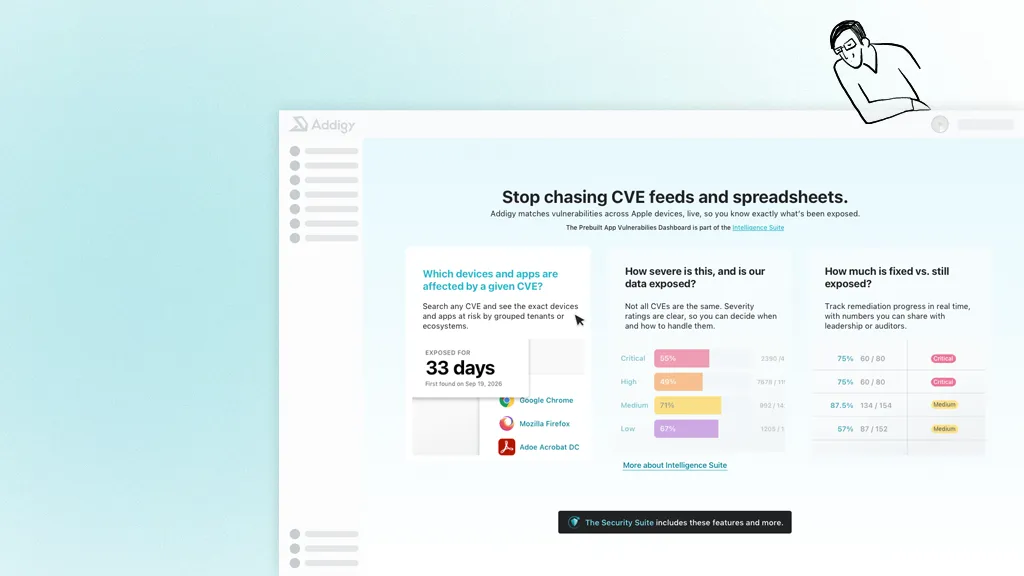
The Prebuilt Apps Vulnerability Dashboard, which brings CVE monitoring to Prebuilt Apps, is now available in the Addigy Intelligence Suite. Addigy packages, tests and ships every app release so you don’t. Deploy it once and your fleet stays current, with no scripts to maintain, no tickets to chase, and no afternoon lost to an app update. It checks the app versions running on your Macs against published CVE data, shows which devices are exposed, names the version that fixes each vulnerability, and tracks patching device by device.
The reason is simple: Mac admins can’t fix what they can’t see.
Why is tracking CVEs in apps so hard?
Many Mac admins track third-party app CVEs by hand. They read vendor advisories, cross-reference scanner output against installed versions, then script or push the fix. The slowest part of getting from “CVE published” to “fleet patched” is often working out which Macs are affected and which version fixes the problem.
Standalone scanners help, but they report everything on the filesystem, and an admin can’t act on much of that. Some teams have no app-level CVE visibility at all. Patching isn’t automatic either. Mac App Store apps don’t enforce updates, so a vulnerable version can sit on a Mac for weeks.
What is the Prebuilt Apps Vulnerability Dashboard in Addigy?
The Prebuilt Apps Vulnerability Dashboard compares the Prebuilt App versions on your managed Macs against the National Vulnerability Database (NVD). It flags actively exploited CVEs from CISA’s Known Exploited Vulnerabilities (KEV) catalog and shows which devices are still at risk.
What it covers: third-party apps in the Addigy Prebuilt Apps catalog. More than 100 catalog apps, including browsers, collaboration tools, developer tools and VPN clients, can be matched against NVD, and coverage keeps growing. That includes apps your users installed themselves, such as Spotify, Discord, or a browser like Brave. Addigy takes over keeping them current. It doesn’t uninstall anything.
That scope is deliberate. Every vulnerability on the dashboard is one you can fix through Addigy. If you run an EDR with full-filesystem CVE scanning, keep it.
This dashboard answers a narrower question: of my vulnerabilities, which can I fix right now, and how far along am I?
How does Addigy detect vulnerabilities on Mac devices?
Addigy checks NVD daily, matches new CVEs to the Prebuilt App versions on your devices, and ranks them by severity and KEV status. Device app inventory reports every five minutes, so patch progress updates within minutes of a device updating.
- Scan. Each day, Addigy checks recent versions of every covered app, plus any version a policy pins, against newly published CVEs. [Link: knowledge base for exact scan window]
- Match. CVEs are matched to apps, then to the devices that have the app assigned. Counts reflect the apps you manage, not every device in your account.
- Prioritize. Each CVE shows a severity tier (Critical, High, Medium, Low) from its CVSS score, plus a red indicator if it’s on the KEV list. Summary cards show which apps carry the most open CVEs and your patch rate per tier.
There’s nothing extra to deploy. The dashboard uses the Addigy agent already on your Macs.
Plus, access is permission-controlled, with a separate permission for excluding devices.
How is the Prebuilt Apps Vulnerability Dashboard different from other Mac vulnerability tools?
Most teams use one of three approaches. Each answers a different question.
| Manual tracking | Filesystem scanner / EDR | Prebuilt Apps Vulnerability Dashboard | |
|---|---|---|---|
| Best at answering | “What did the vendor publish?” | “What vulnerable software exists on this Mac?” | “Which of my managed apps are exposed, and what do I do about it?” |
| Scope | Whatever you have time to read | Everything on disk | Apps in the Prebuilt Apps catalog |
| Fix version shown | If you look it up | Varies by tool | Yes, per CVE |
| Device-level patch progress | Spreadsheets and scripts | Typically a separate workflow | Built in, per device |
| Audit trail for exclusions | Manual | Varies by tool | Reason required, logged in System Events |
| Update enforcement (new) | Scripts you write | Reporting only | Prebuilt Apps enforce updates by a deadline |
These approaches are complementary. A scanner gives you breadth, and the dashboard gives you a short list you can act on, with the fix attached.
Because the dashboard sits inside the Device Management Service that already deploys your apps, there’s no handoff between finding and fixing. Because Prebuilt Apps enforce updates by a deadline, the fix actually happens, unlike App Store apps that update when they choose to.
Click any CVE to open its Patch Report: affected version, fixed version, when the vulnerability first appeared in each policy, a remediation percentage, and every device marked patched or at risk. Shadow IT stays patched instead of becoming your next audit finding.
Some devices can’t be patched, like a lab machine or a Mac pinned to an older version for compatibility. You can exclude those, but you must enter a reason. Every exclusion and removal is logged in System Events with the user who made it.
Who benefits from the Prebuilt Apps Vulnerability Dashboard?
IT teams. See exactly which Macs are exposed to an actively exploited vulnerability and how far patching has progressed. Per-CVE remediation percentages, patched dates and audited exclusions give you clear evidence when you report to leadership, answer security reviews or fill in cyber-insurance questionnaires.
MSPs. Scope the dashboard to a single policy to see one client’s exposure at a time, ranked by severity and KEV status. Remediation progress shows each client what you’ve patched and why it mattered, which works well in a QBR or as proof behind a managed security service.
How do I get started with the Prebuilt Apps Vulnerability Dashboard in Addigy?
- Get Intelligence Suite access. Addigy customers: ask your rep to trial the Suite. Newcomers to Addigy: sign up for a free trial.
- Assign Prebuilt Apps through policy. Only apps assigned to devices are monitored. Use Update Only for apps you don’t want to push to everyone. If a user prefers Brave, or installed Spotify or Discord on their own, Addigy keeps those apps patched without installing them across your fleet.
- Grant permissions. Give admins the view permission, and the exclusion permission where needed.
- Open the Prebuilt Apps Vulnerability Dashboard. Filter by severity or policy, search by app or CVE ID, and click any CVE for its Patch Report.
What’s coming next: performance enhancements, a new look and feel, and reporting
We’re improving dashboard speed, refreshing the interface to surface more data, and building historical reports that show how many CVEs you’re remediating over time.
To learn more about what’s coming, reach out to your Addigy account representative.
Want to try Addigy for Apple MDM? Contact us for a demo and ask about recent promotions.
See the initial CVE dashboard walkthrough for Prebuilt Apps here
Frequently Asked Questions
Does the Prebuilt Apps Vulnerability Dashboard cover third-party Mac apps?
Yes. It covers third-party apps in the Addigy Prebuilt Apps catalog, with more than 100 apps matched against NVD, including major browsers and collaboration tools. It doesn’t cover macOS itself or apps installed outside the catalog.
How often is CVE data updated?
Addigy pulls NVD and CISA KEV data once a day. Device app versions report every five minutes, so patch progress updates within minutes of a device updating.
Does it work on apps my users installed themselves?
Yes, if the app is in the Prebuilt Apps catalog and assigned to the device through Update Only. Addigy takes over keeping it up to date. It doesn’t uninstall the app.
Can Addigy patch the vulnerabilities it finds?
Yes, when a fix exists. Each CVE shows its fixed version, which you deploy through your Prebuilt Apps policy. If the vendor hasn’t released a fix yet, the fixed version reads N/A.